Agent Teams & Subagents 
In the Prompt Lab you gave your project a brain — a CLAUDE.md. Now design the workers who use it. Set multiple AI agents working on different parts of a project simultaneously — like managing a small team rather than doing every task yourself.
Once you've got an agent working for you, take it to the Website Builder and put it to work. You can practice parallel agents on any routines, tasks, or things you want improvement on!
From Solo Builder to Team Director
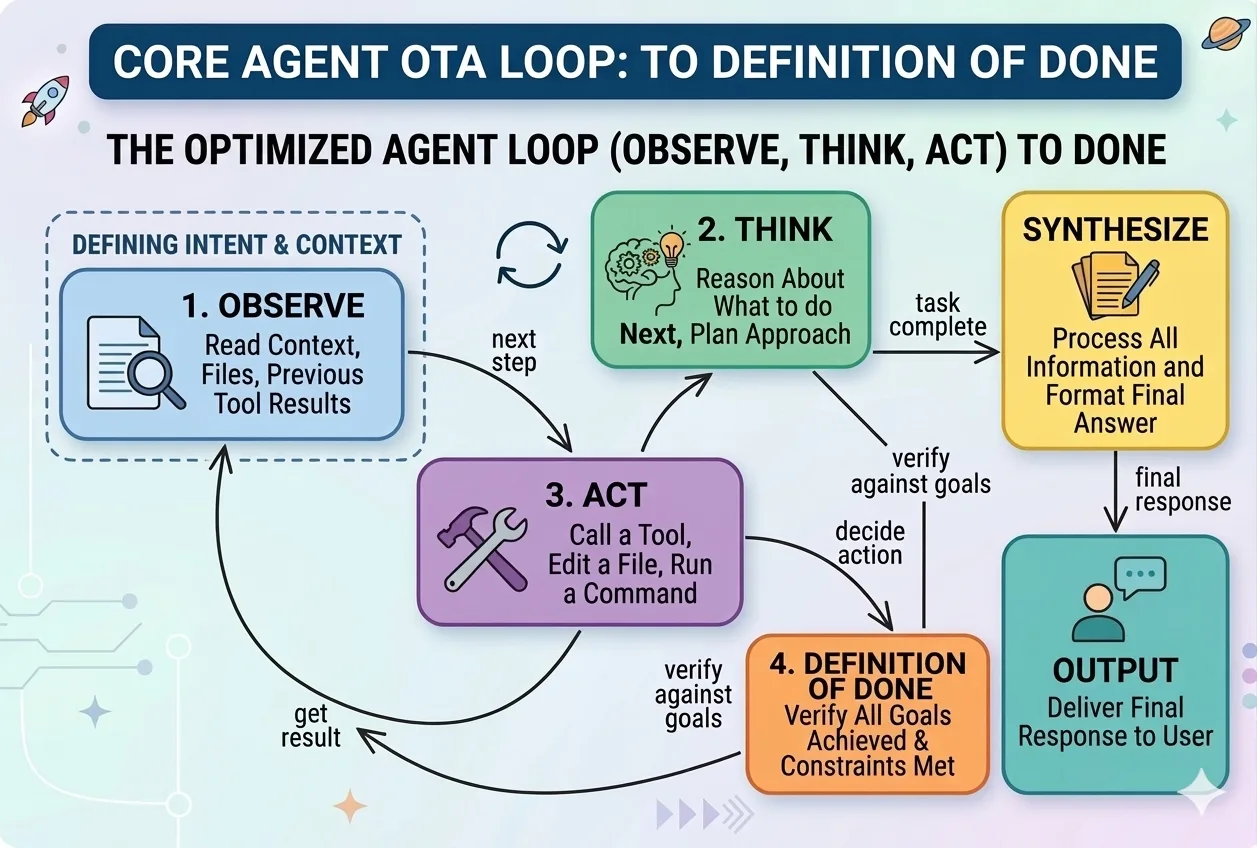
A subagent is Claude Code working on one specific task while you or another agent works on something else at the same time. Instead of building your website page by page, you could have one agent writing copy, another designing layout, and another setting up the contact form — all at once.
Think of it like hiring three freelancers. Each gets a clear brief, works independently, and delivers back to you. You're the project manager — not the one writing every line.
A task that takes 4 hours sequentially might take 1 hour in parallel. The moment a project has 3, 5, or 10 independent pieces, doing them one at a time becomes the bottleneck. Run them all at once and you only wait for the longest one.
This is how real engineering teams work — and now you can do it with AI agents instead of people.
Give AI a clear prompt that splits the work. Here's one you can try right now:
“I want to improve three things on my website simultaneously. One agent makes the home page copy more compelling, another improves the about page design, and another adds a testimonials section to the work page. Give me a plan for running all three at once and what I need to review when each is done.”
The pattern is always three parts: define the tasks, request parallelism, and set a review checkpoint. Works for anything — reports, research, code, content, planning.
What you've done today is not just build a website. You've learned to think like a director rather than a doer — from asking AI a question, to giving it a job, to managing a team of agents in parallel.
The most powerful thing AI gives you is not speed. It's the ability to manage more than one thing at once without losing quality or control. That's the real unlock.
How Agents Actually Work
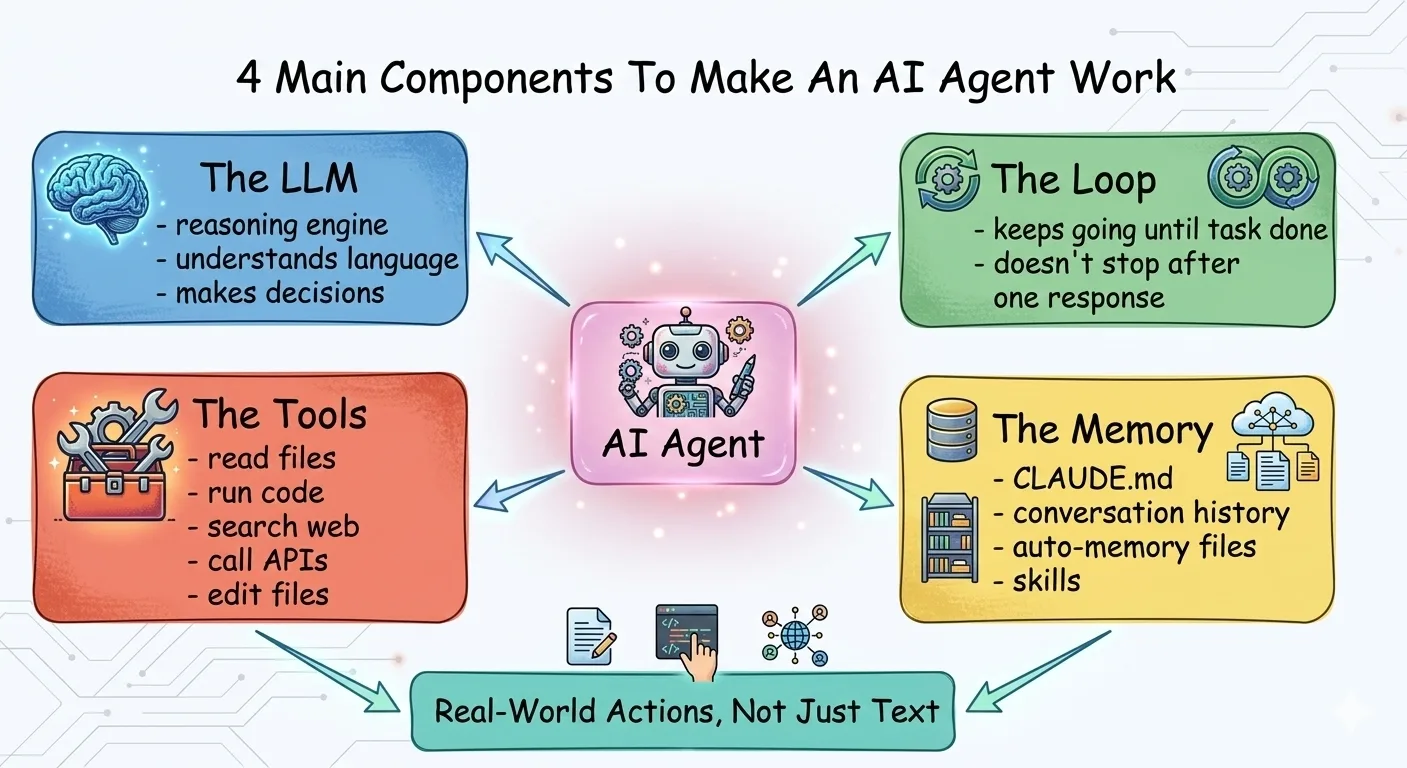
From single agents to multi-agent teams. Understand the building blocks, then design your own.
Identity
Who is this agent? Its role, personality, and area of expertise.
- CodeReviewer: meticulous senior engineer
- ContentWriter: brand-voice copywriter
Skills
What can it do? Think job qualifications — specific, measurable capabilities.
- Search the web for current info
- Read and summarize PDF documents
Tools
What does it have access to? APIs, files, databases, external services.
- GitHub API, CI/CD logs
- Slack, email, file system
Goals
What does success look like? Specific outcomes and quality criteria.
- Every PR reviewed in 5 minutes
- Zero critical bugs reach main
Agent Builder — Write Your First agent.md
Now put it into practice. Design your own AI agent using Peter's 4-Step Agent Setup, then copy the spec into a file named agent.md (or paste it as a system prompt). Same trick as your CLAUDE.md: write it once, and the agent shows up already knowing its job — every session. You don't need to be technical: a dashboard that updates itself or a website that maintains itself is exactly what agents are for.
Who is this agent? Give it a name, role, and personality. Developer example: "CodeReviewer — a meticulous senior engineer who catches bugs." Workshop example: "Data Buddy — a patient, plain-English analyst who runs my dashboard and never uses jargon."
Skills are the specific capabilities your agent has — think of them as job qualifications. Be concrete: "Read my spreadsheet and spot what changed", "Update my dashboard charts", "Check my site on phone-size screens", "Summarize long documents to one page". List 3-5 skills that define what this agent CAN do.
What does this agent get access to? Developer example: "GitHub API, the test suite, CI/CD logs." Workshop example: "My project folder, my data.csv, and a browser to show me the result." Tools are the boundary — an agent can only touch what you hand it.
What does success look like? Be specific and measurable. Developer example: "Zero critical bugs reach main." Workshop example: "Every Monday I open one page and understand my business in 60 seconds. Zero made-up numbers. Nothing changes without my OK."
Your agent.md
Fill in the 4 steps above to generate your agent spec...
Try It — Pick a Pattern
Each of these is a prompting technique you can use right now. Pick one, copy the example, and try it on your own project. Hit Try Another to see more examples. These are the building blocks for directing agents effectively.
Go Deeper — How Agent Systems Get Smarter
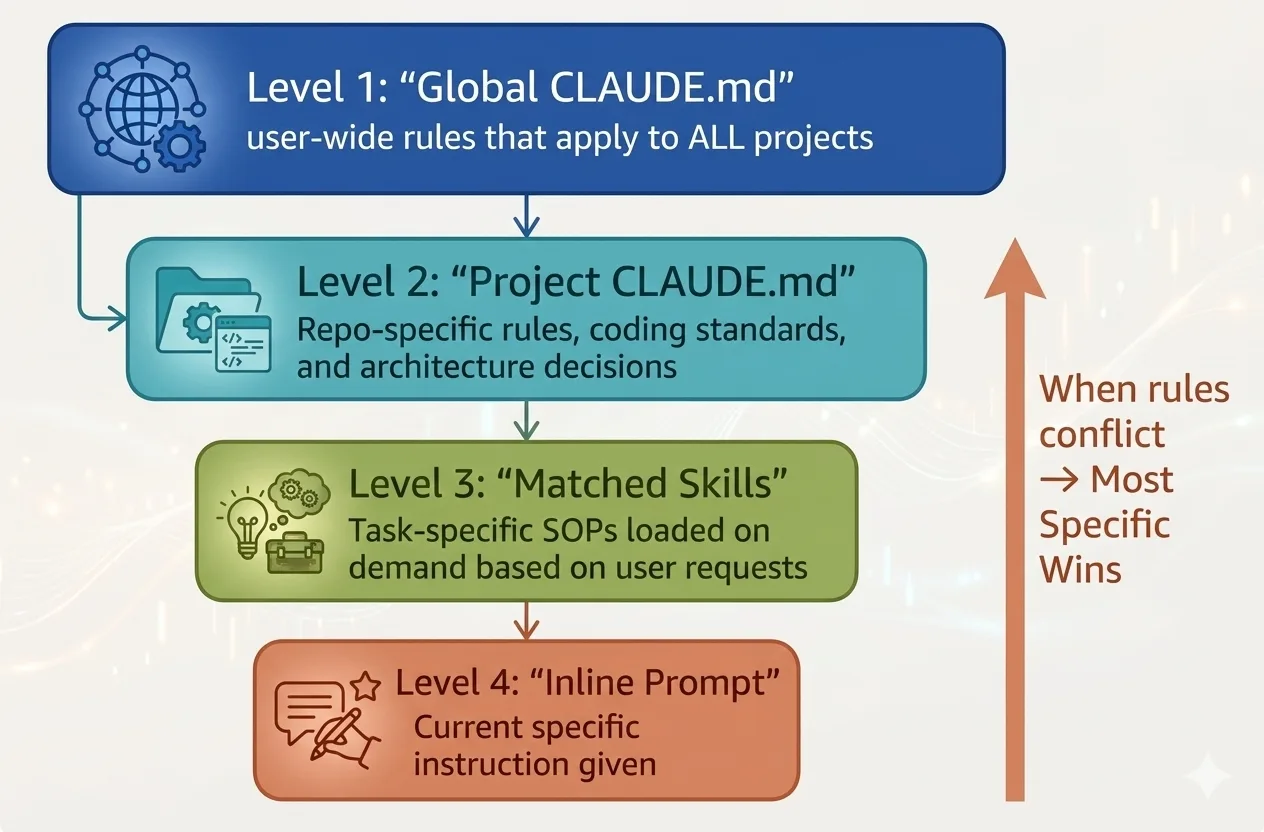
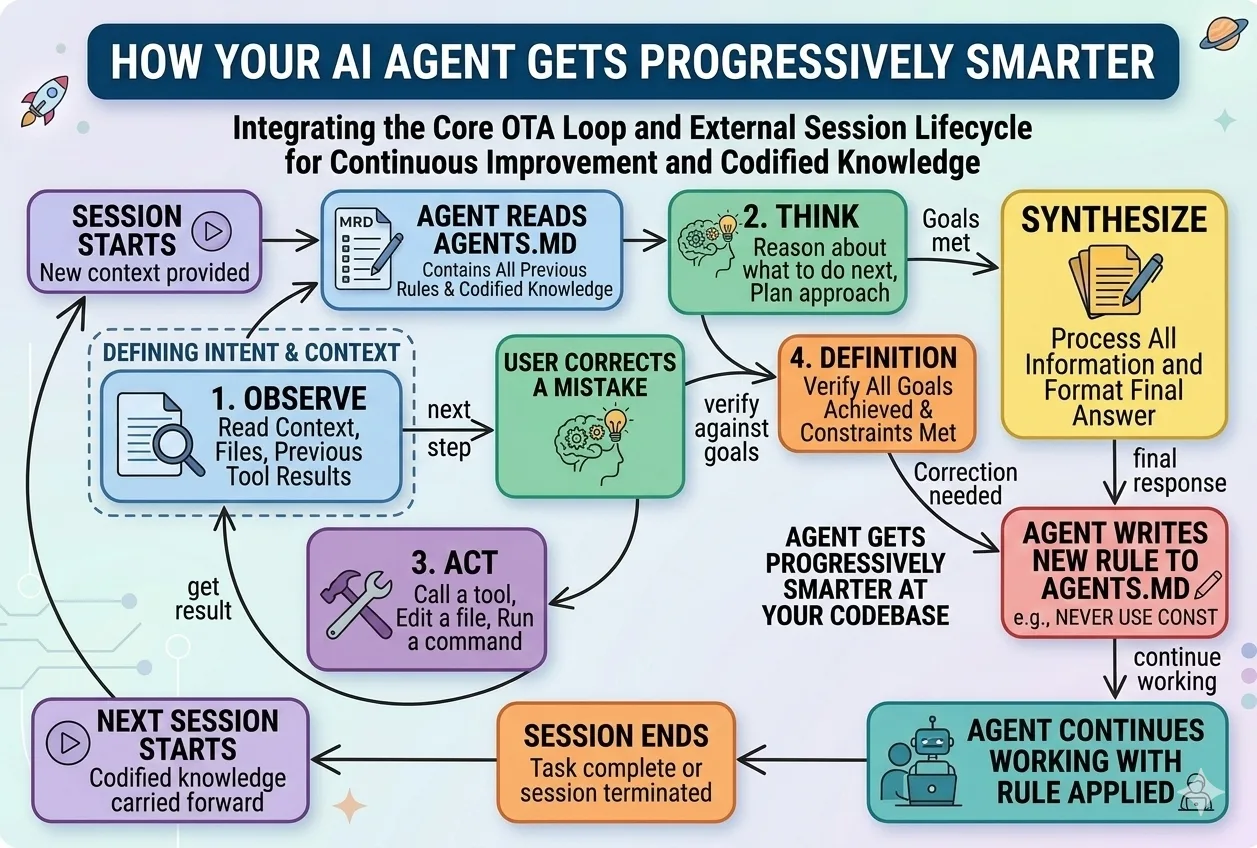
Everything above gets one agent (or three) shipping. This is the graduate class: how the CLAUDE.md you built layers into a hierarchy, how knowledge compounds across sessions, and how teams of agents check each other's work — the same patterns Peter runs across his own 300+ agents.
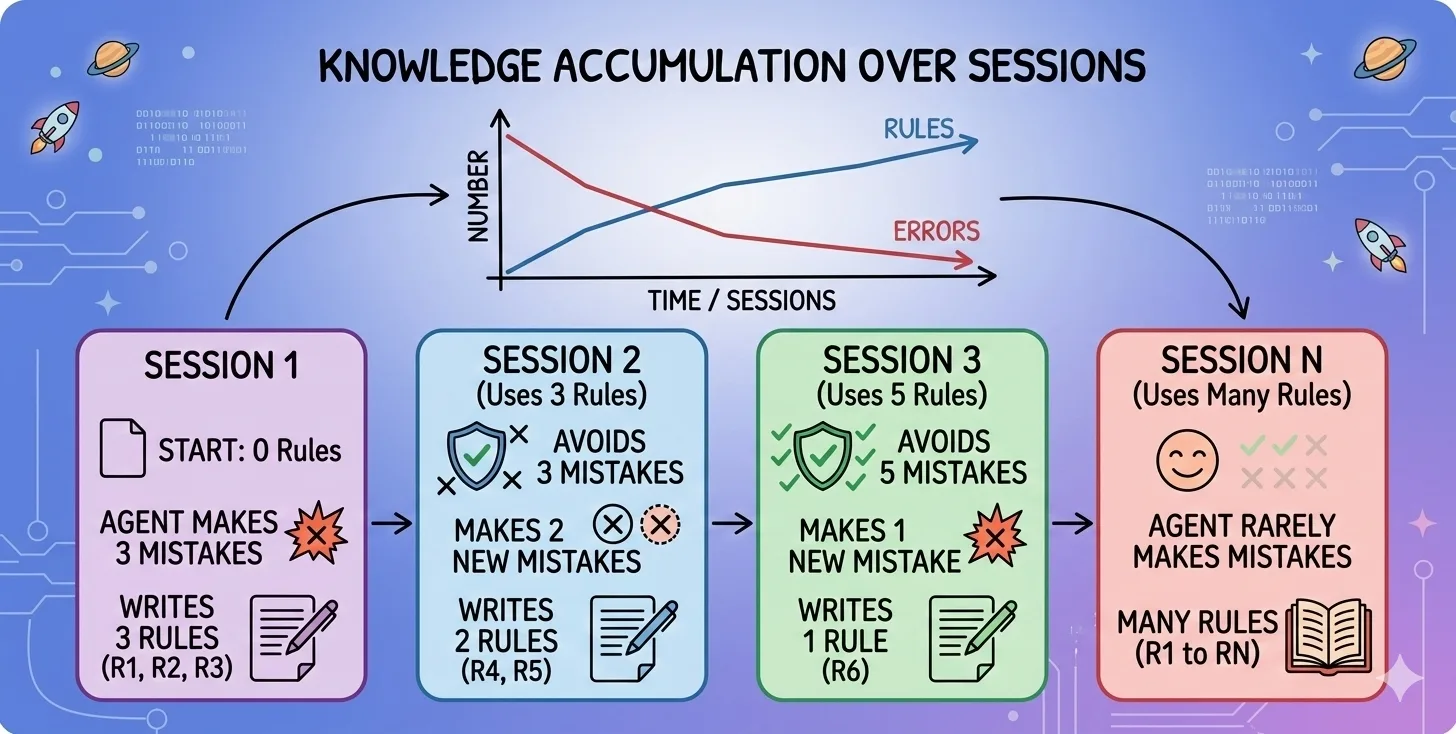
Put Learning on Auto-Pilot
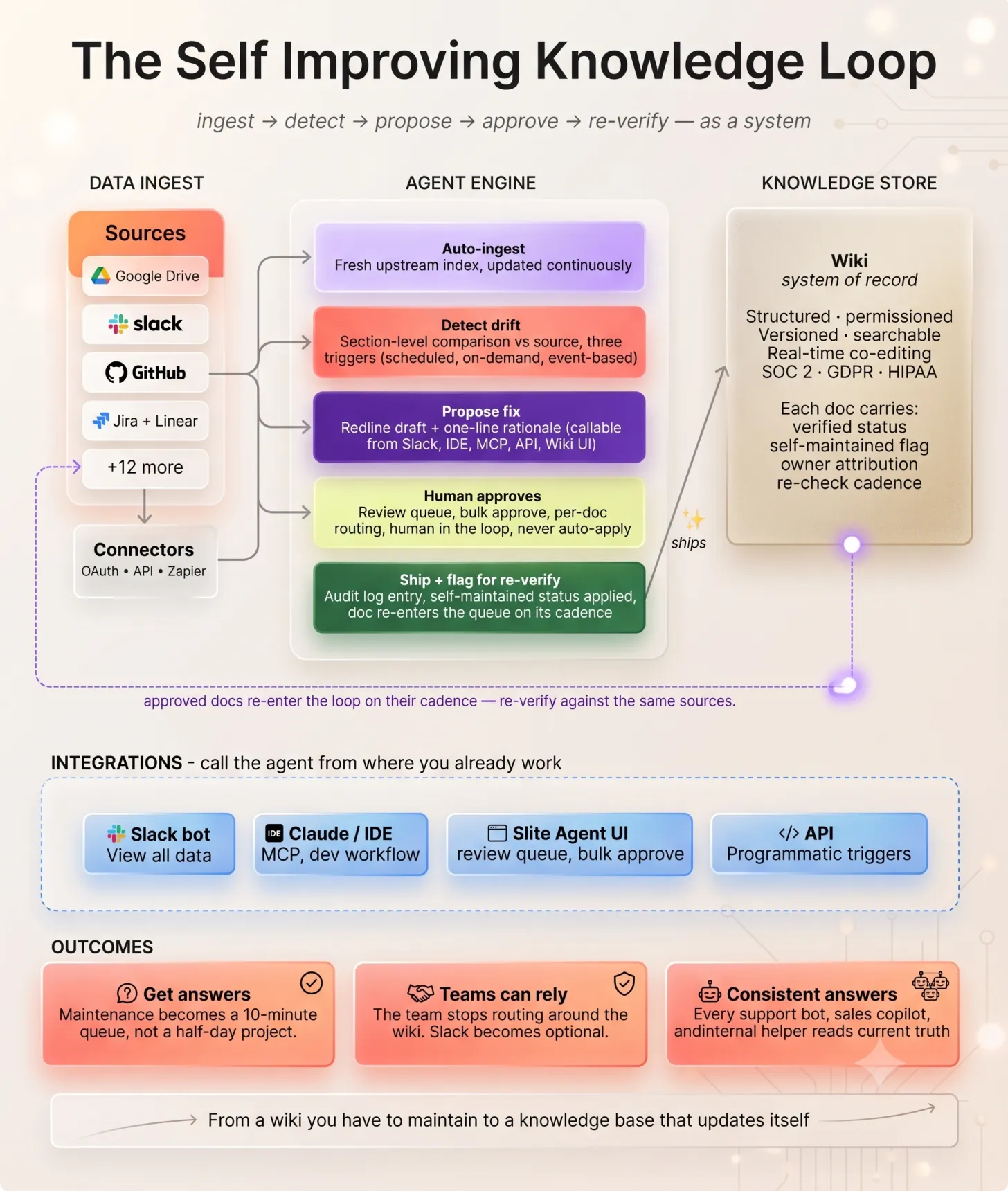
Everything above happens inside a single session. The bigger unlock is wiring that learning into a loop that runs whether you’re watching or not. Left alone, knowledge rots: the wiki drifts from the code, Slack quietly becomes the real source of truth, and every answer needs a human to sanity-check it. A self-improving system closes that gap on its own.
The shape is a loop, not a one-time cleanup. Agents ingest your live sources — Drive, Slack, GitHub, Jira — detect where the docs have drifted, and propose redline fixes with a one-line rationale. A human still approves; nothing auto-applies. But once a doc ships, it re-enters the queue on its own cadence and re-verifies against those same sources. Maintenance goes from a half-day project to a ten-minute review queue — and your knowledge base keeps itself current.
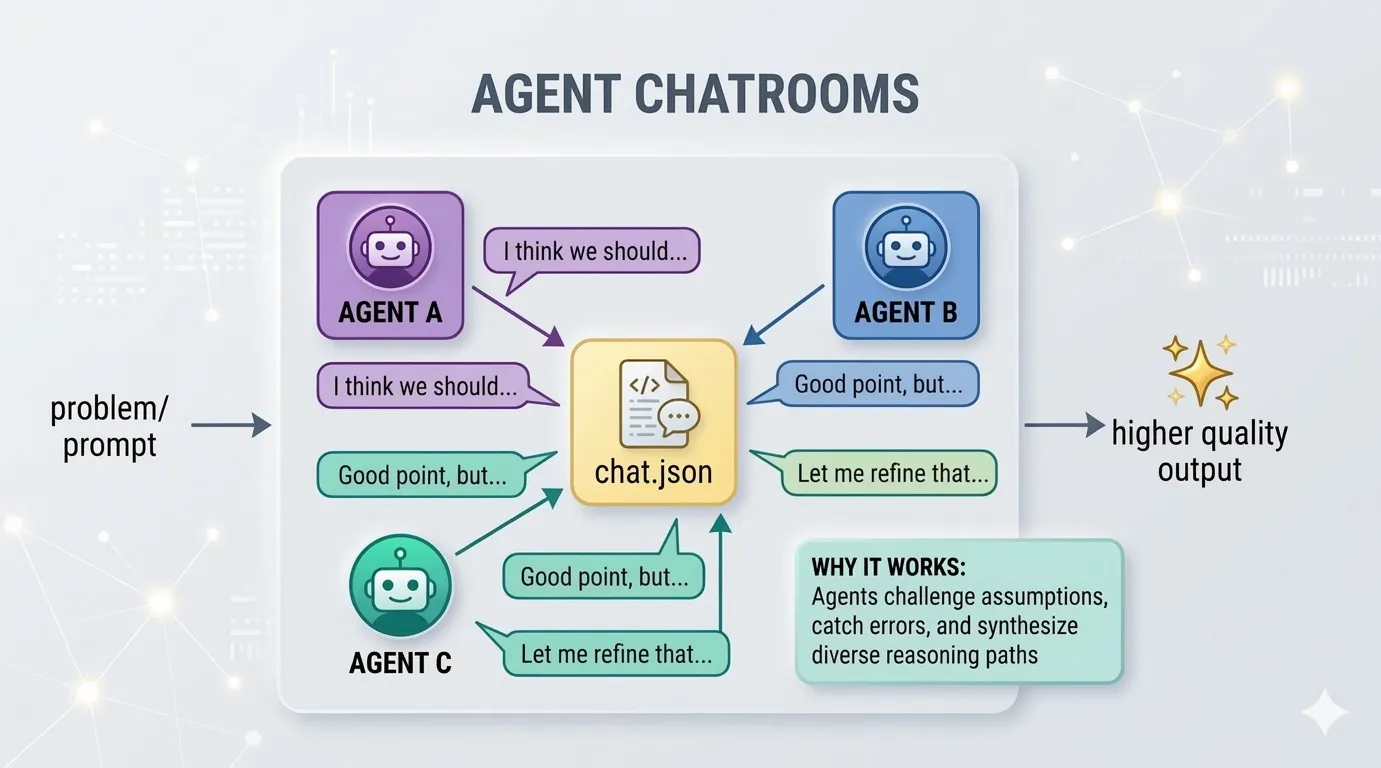
Agents That Check Each Other
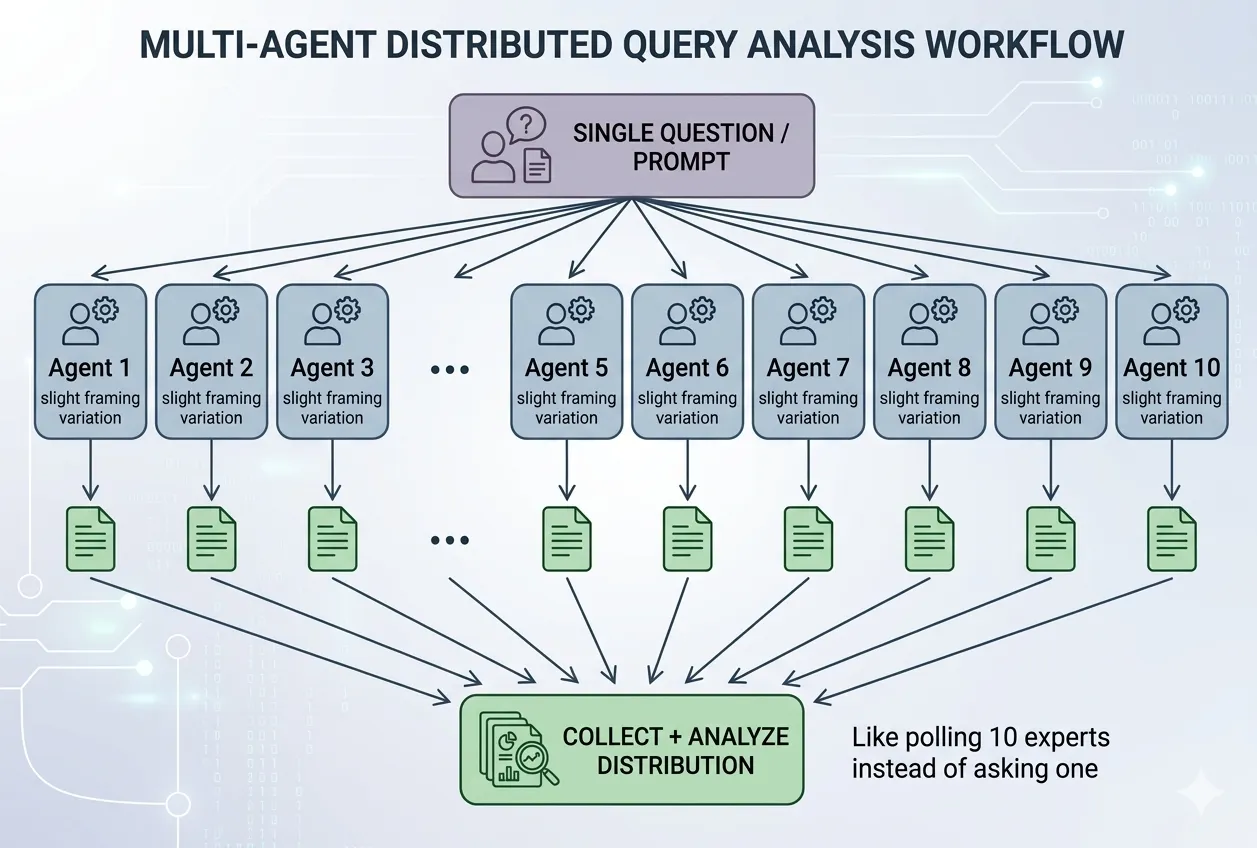
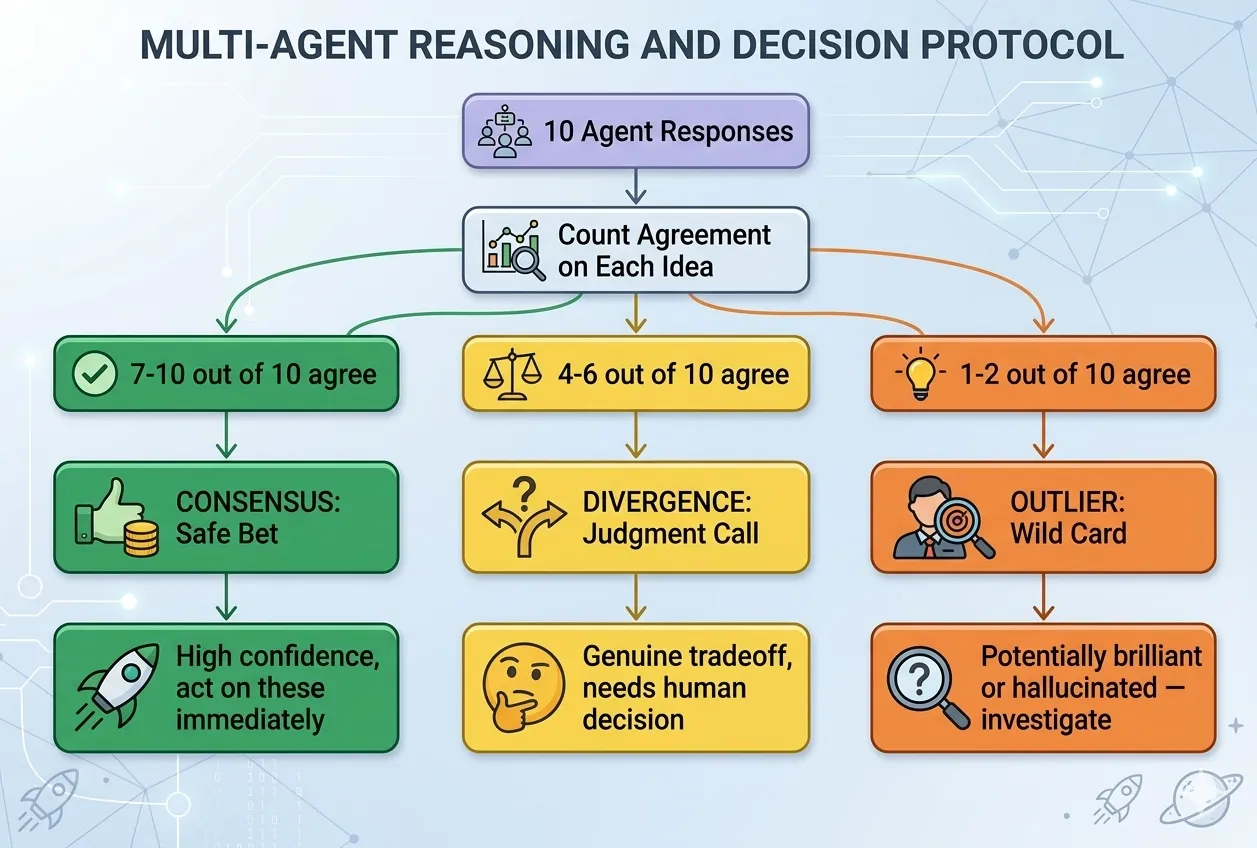
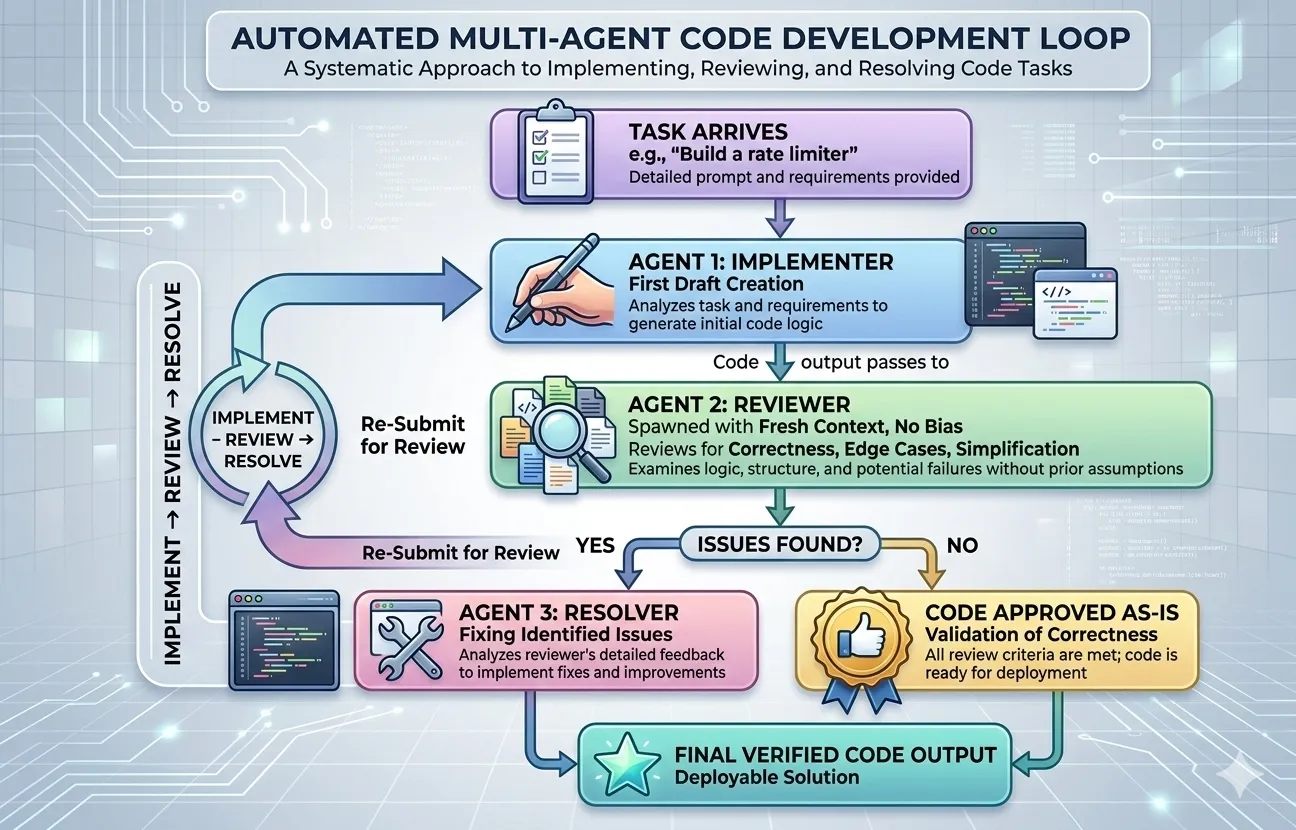
One agent answering is an opinion. Ten agents answering independently is a signal — and a reviewer agent that reads the actual work (not the builder's report) is how mistakes get caught before they ship.
Get Your Agents to Actually Finish
The hard part of working with AI agents isn’t getting them to start — it’s getting them to truly finish. Agents declare victory early, lose the thread between sessions, and quietly drift. The fix isn’t a smarter model — it’s a better harness: the rules, memory, and checks you put around the agent so it finishes reliably, session after session. Here are the six habits that separate a hobby prompt from a production setup.
Before the agent starts, define done in plain, checkable terms: not “build the login page” but “a user can sign in, a test confirms it, and the app still starts.” If you can’t state how you’d verify it, the agent can’t know when to stop — so it stops too early.
Maintain a simple list of features, each with its own “how to check it works” and a status. The rule that matters: a feature only flips to done when the check actually runs and passes — the agent records the proof, it doesn’t just declare it. This one habit kills the “I think that’s working” problem.
Give every project a single startup-and-verify command (a script, a test run, a smoke check). A fresh agent session should be able to run it and instantly know: is this in a good state, or already broken? Build on a broken base and you just pile mess on mess.
Check work in three layers, and stop at the first failure: does it read right (no obvious errors), does it run right (tests pass, the app starts), and does it work end-to-end (the whole flow actually completes)? “Code was written” is not done. “Verification passed” is done. A second agent that only checks — not the one that built it — catches what the builder talks itself past.
The truth lives in the project’s files — what it is, how to run it, what’s done, what’s next — not in a chat window that vanishes. The test: open a brand-new session with nothing but the repo. If it can’t figure out how to run and verify the project, the project is under-documented, and every session pays the cold-start tax again.
Keep a short scorecard: is each part of the project getting stronger or weaker? Per-task review asks “was this session good?” The scorecard asks “is the whole thing trending up or quietly rotting?” It’s how you catch decay before it becomes a fire.
Want to pressure-test your own setup? Paste this into your AI and let it audit you:
“Act as a harness-engineering reviewer. Ask me how I work with AI agents, then score my setup on six habits: (1) a written definition of done, (2) a feature list where status is gated by a real check, (3) a one-command verify path, (4) three-layer verification with an independent checker, (5) project state stored in files not chat, (6) a quality scorecard tracked over time. For each, tell me where I’m weakest and the single smallest change that would help most.”