MCP & Tool Use 
An AI without tools is a brain in a jar. Tool use is how agents go from "here's what I think" to "here's what I did." MCP (Model Context Protocol) is the open standard that makes every tool plug-and-play.
1. Watch an Agent Use Tools
Pick a scenario and watch step-by-step as the agent thinks about what tool to use, calls it, gets a result, and responds. The agent isn't following a script — it decides which tool fits the task.
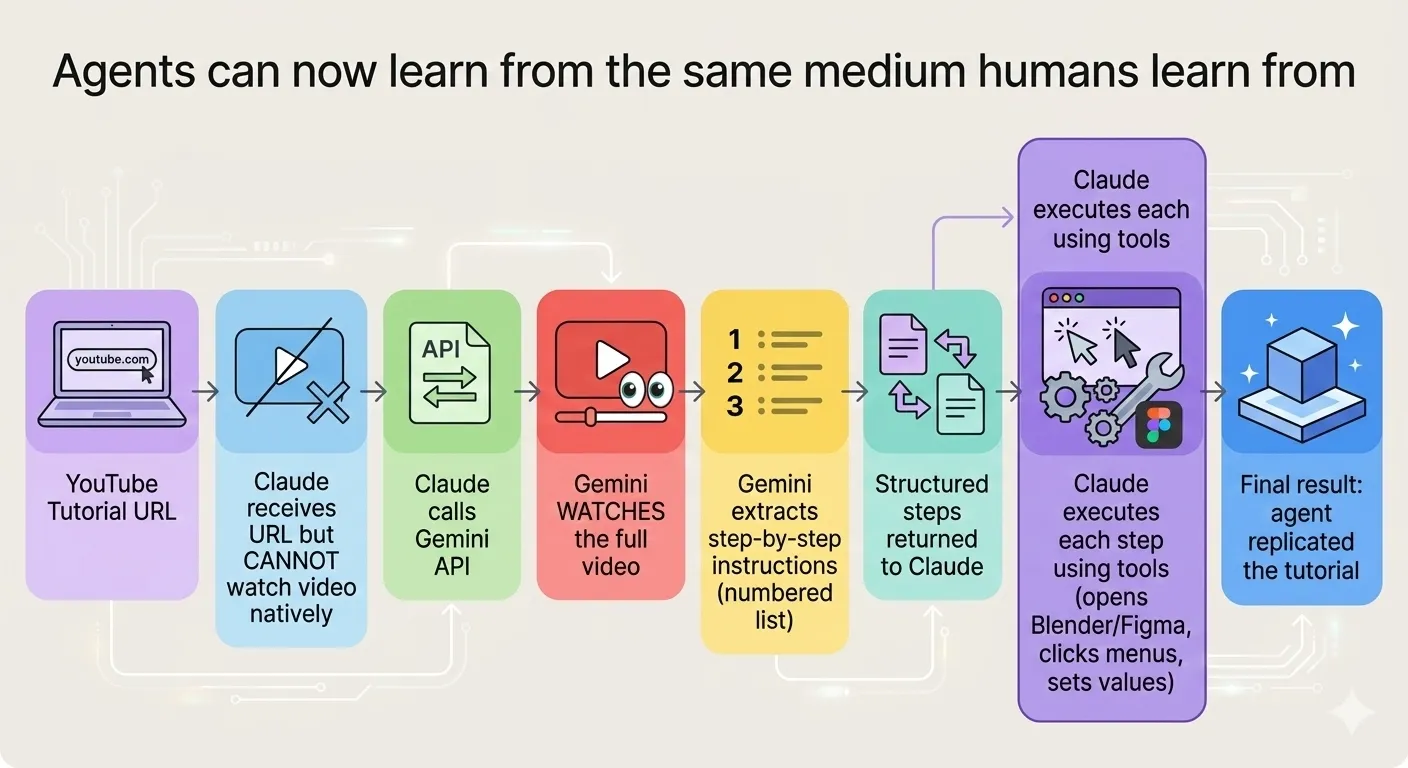
But tool use goes beyond simple lookups. Agents can now learn from the same sources humans do. In this example, an agent receives a YouTube tutorial URL, watches the video through an API, extracts step-by-step instructions, then executes each step using its own tools — replicating the tutorial automatically.
Now try the interactive demos below to see the basic building blocks — how an agent thinks, calls a tool, and responds:
2. MCP: USB-C for AI
Before MCP, every AI tool integration was custom. Want to connect to Gmail? Build a connector. Slack? Another connector. Database? Yet another. Model Context Protocol (MCP) is a universal standard — one protocol, every tool.
3. Build a Tool Definition
This is what agents actually see when they look at available tools. Try building one — give it a name, describe what it does, and add parameters. Watch the JSON schema update in real-time.
4. What Can Agents Actually Do?
Here are the major categories of tools agents can connect to. Click any card to see real examples of what that tool enables.
Before exploring individual tool categories, here's what a complete agent workflow looks like end-to-end. One agent, one task: find a website's contact form, extract the fields, fill them out, and submit. No human clicks — the agent handles the browser, the reading, and the typing.
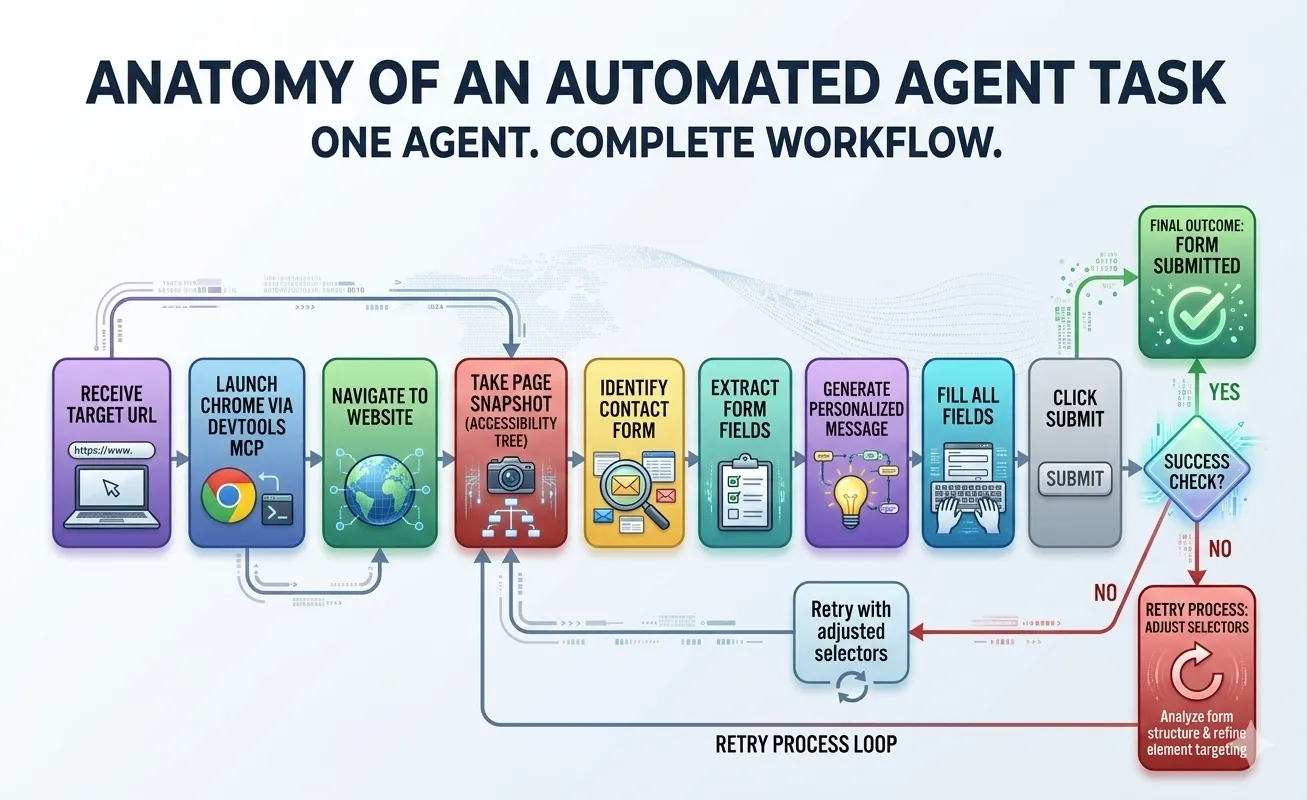
Each step in that workflow uses one or more of the tool categories below. Click any card to see what's possible:
4b. Scale Up: Agent Swarms
One agent filling out one form is useful. But what if you need to hit 50 websites in an hour? Instead of running one agent 50 times, you spawn a swarm — an orchestrator agent that launches multiple worker agents in parallel. Same workflow, multiplied.
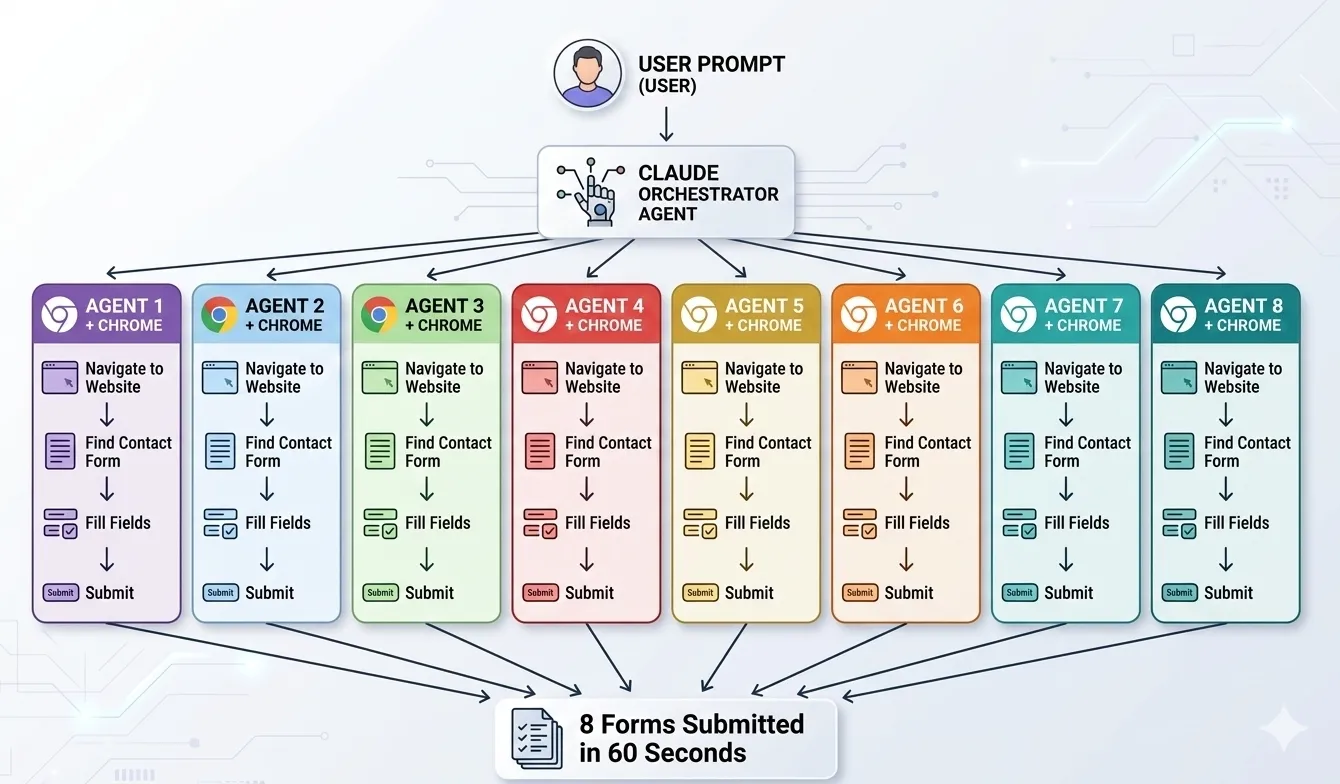
In this example, a single prompt triggers 8 agents working simultaneously — each navigating to a different site, finding the contact form, and submitting. 8 forms in 60 seconds instead of 8 minutes. This is where tool use stops being a convenience and starts being a competitive advantage.
5. The Trust Question
"Why would I let AI send emails?" — Fair question. Here's how tool use stays safe.
Guardrails That Matter
- Human-in-the-loop: Sensitive actions (send email, delete files, deploy code) require explicit human approval before execution. The agent proposes, you approve.
- Scoped permissions: Tools can be read-only or read-write. An agent might read your calendar but not create events. Read your email but not send replies.
- Sandboxed execution: Code runs in isolated containers. File access is restricted to specific directories. Network access can be limited.
- Audit trails: Every tool call is logged — what was called, with what parameters, and what was returned. Full transparency.
- Rate limits: Prevent runaway agents from making 1,000 API calls. Set hard limits on actions per session.
Give agents read-only access first. Once you see they handle it well, add write permissions for low-risk actions. Graduate to autonomous actions only for repeatable, well-tested workflows. Same way you'd onboard a new employee.
Key Takeaways
Personality is who it is (tone, role, expertise). Goals are what it's trying to accomplish. Tools are external capabilities it can call (APIs, databases, email). Skills are learned behaviors — multi-step workflows it knows how to execute, like "deploy a website" or "write a PR review." Tools are atomic actions; skills are choreography.
Tool = a single capability: "send email," "read file," "query database." Skill = a workflow that chains tools together: "research a topic, draft an article, optimize for SEO, and publish it." You give an agent tools; the agent develops skills by combining them.
You describe what each tool does (like the JSON schema in the builder above). The agent reads those descriptions and picks the right tool for each task. That's why good tool descriptions matter more than good tool code.
Before MCP, every AI app built custom integrations for every tool. MCP standardizes the connection — like USB-C for AI. Build one MCP server for Gmail, and every AI app can use it. This is why the tool ecosystem is exploding.
Start with read-only tools. Add write permissions when you're comfortable. Go autonomous only for proven, repeatable workflows. Always keep audit logs. Treat AI agents like new hires — earn trust over time.